



















What’s a CSR?
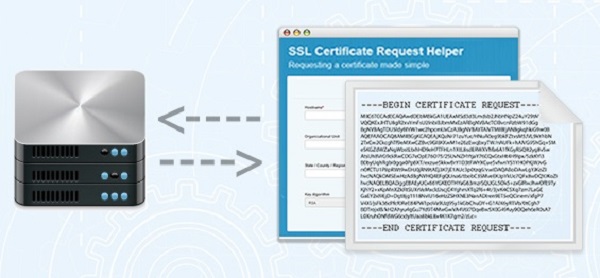
If you have ordered an SSL Certificate before, you were most likely asked to provide a CSR. The CSR is used to deliver the public key that your server will use to identify itself. Generating a CSR can be a hurdle for non-technical staff that aren’t always familiar with the command lines that need to be created and today still remains a time-consuming process even for more experienced users.
CSR Creation Made Easy
Our new CSR creation tool makes it easy to generate the CSR for your server by simply inputting your certificate information (e.g. domain name, organization details, etc.) in the fields provided. The tool will automatically generate the command lines required to create the CSR on your webserver, so you don’t need to write them yourself.

The CSR tool provides command lines for most popular webservers, including OpenSSL, Exchange 2007, IIS and F5 Big-IP.

Bonus Features: Advice on Best Practices
To ensure your SSL Certificates are compliant with the latest security best practices, the CSR tool automatically defaults to the most secure algorithm (RSA) and only offers key length options in line with the latest CA/B Forum guidelines (2048 bit minimum).
Use The Tool
The CSR tool is available in multiple languages at https://csrhelp.globalsign.com and includes support information and FAQs for additional help with the CSR generation process. Secure you website today with SSL the easy way.
You can read the original article here.
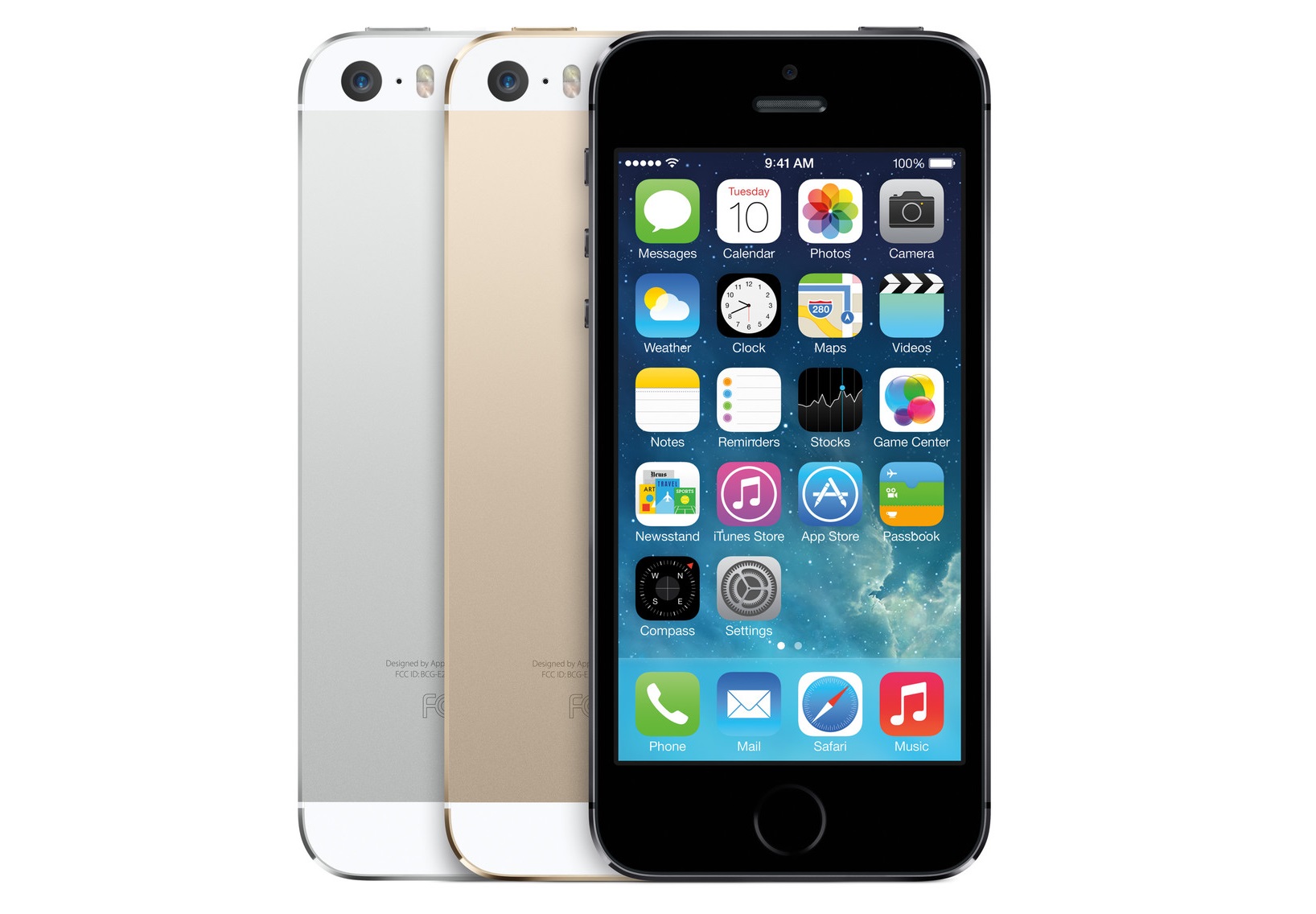
The authentication system, based on a new material for the home button and a metal sensor ring around it, has been the subject of numerous rumours and leaked photos and specs already. Speculation about Apple’s interest in fingerprints goes back at least as far as 2009, resurfaces each time a new version of the iPhone is launched, and has grown steadily ever since Apple’s pricey acquisiton of fingerprint tech firm AuthenTec last summer. Today’s confirmation at the iPhone 5s/5c launch ceremony makes it all official at last. According to Apple’s promotional material, the sensor:
“uses advanced capacative touch to take, in essence, a high-resolution image of your fingerprint from the sub-epidermal layers of your skin. It then intelligently analyses this information with a remarkable degree of detail and precision“.
As well as unlocking the phone, the sensor will be able to approve purchases at the Apple store. Fingerprint authentication has been a common sight in laptops for some time, with major vendors including Dell, Lenovo and Toshiba pushing their own built-in variations, usually available as an option alongside more traditional login methods. There are also a range of other implementations available, including many smartphone apps and external readers supported by the Windows Biometric Framework and some leading password managers.

Fingerprints thus probably rank a little above facial recognition as the most widely-deployed biometric authentication technique at the moment. In the past, however, they have proven rather unreliable, plagued with security worries, although suspected flaws are not always proven. Nevertheless, many fingerprint scanners seem to be open to spoofing. Fingerprints are not secret: we leave copies of them wherever we go, even if we’re trying hard not to, as cop show afficionados will be well aware. Once someone devious has got hold of a copy, purely visual sensors can be fooled by photographs, while more sophisticated techniques which measure textures, temperatures and even pulses are still open to cheating using flesh-like materials, or even gelatin snacks. Just how hard it will be to defeat Apple’s recognition system remains to be seen, but as crypto guru Bruce Schneier has pointed out, there’s a big danger in using fingerprints to access online services: the temptation to store the fingerprint info in a central database. Unlike passwords, of course, if your fingerprint data is lifted from a hacked database, you can’t simply change it, short of getting mediaeval on your hands with acid, sandpaper or some other hardened-gangster technique.

So, as expected, Apple has opted to keep all information local to the iPhone – indeed, it is apparently kept in a “secure enclave” on the new A7 chip and can only be accessed by the print sensor itself. Expect this storage area and the connections to it to become the subject of frenzied investigations by hackers of all persuasions. Of course, Apple is not alone in looking into fingerprints, with arch-rivals Samsung also rumoured to be making moves in that direction. (Samsung was a major customer of AuthenTec before it was acquired.) In the long term, how similar their approaches are may be a significant issue for all of us, whatever our smartphone affiliation and whether or not we worry much about privacy, and not just thanks to the inevitable legal rumpus. There are two basic approaches to security: either the way things work is kept proprietary and secret, as far as possible, or it’s made open for general consumption, and more importantly for verification. A cross-vertical group, the FIDO Alliance, was set up earlier this year to develop open specifications for biometric authentication standards, with members including Google, PayPal, hardware makers like Lenovo and LG, and a raft of biometrics and authentication specialists. Beleaguered phonemaker BlackBerry is the latest big-name inductee. The alliance’s aim, to create a universal approach to implementing biometrics in combination with existing passwords and two-factor dongles, is a noble goal. Sadly, given Apple’s history of playing well with others, it’s pretty likely that, as with their connector cables and DRM systems, their fingerprint setup will remain aloof from any attempts to build a truly universal consensus.
Even if a two-culture system prevails, widespread deployment in mass-market handhelds may well be a gamechanger for the adoption of biometric authentication. Touch ID and its inevitable followers could be a major part of all our futures.
You can read the original article, here.

But those signals were not authentic, and the ship was not on course. The signals were in fact being sent from the White Rose’s upper deck by University of Texas/Cockrell School of Engineering graduate students Jahshan Bhatti and Ken Pesyna. A team from the school had been invited aboard while the White Rose sailed from Monaco to Rhodes, Greece, on the Mediterranean Sea. Using a blue box about the size of a briefcase, the duo spoofed the ship’s GPS signals, sending counterfeit signals that slowly, subtly overpowered the authentic GPS signals until the ship ultimately came under their control.
If this sounds familiar, it’s because students from this engineering school did the same thing to a drone last year. In May 2012, the engineering students tried out their $1,000 spoofer, which they had cobbled together in response to a dare from the US Department of Homeland Security (DHS). Under the direction of Assistant Professor Todd Humphreys, who is now working for the Department of Aerospace Engineering and Engineering Mechanics, the students last spring managed to hack and hijack a drone with what Humphreys at the time said was the most advanced spoofing device ever.

Both the drone and yacht hijackings were designed to shed light on the perils of navigation attacks, serving as evidence that spoofing is a serious threat to marine vessels and other forms of transportation. In plain English, that means that hackers can send drones smashing, say, into our skulls.
After the students had gained control of the ship’s navigation system, the team planned to coerce the ship onto a new course with subtle maneuvers that positioned the yacht a few degrees off its original course. When the ship’s navigation system detected the location discrepancy, the crew corrected the course – at least, they thought they did. In reality, their course corrections were setting the ship slightly off its course line. Watch a video about the attack here.
You can read the original article, here.
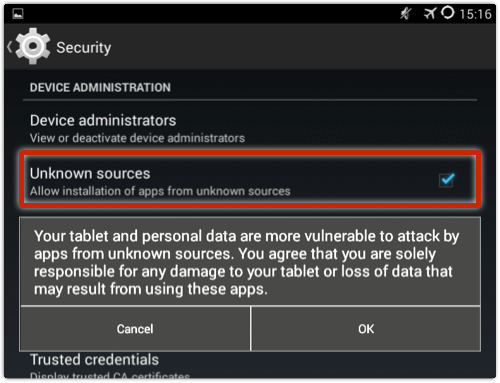
One of our SophosLabs researchers, Anna Szalay, made an interesting discovery recently: a new type of Android malware that slips in through a security hole in the USB debugging feature that allows developers to modify their Android devices. Naked Security expert Paul “Duck” Ducklin reports that this malware can intercept your SMS text messages to steal bank transaction details.
Duck explains in his post that intercepting SMSes from your Android phone allows the attackers to steal information they can use to access, for example, your email accounts or bank accounts:
The crooks want to infect you with malware that knows how to intercept incoming SMSes and redirect their content elsewhere. You can see where this is going: mobile malware that reads your SMSes before you do can steal important data such as the two-factor authentication (2FA) codes sent by your email provider or your bank, giving cybercriminals a way into your account despite the extra layer of protection in place.
SophosLabs detects this SMS-stealing malware as Andr/FakeKRB-H. As Duck explains, this malware gets onto your Android in a multi-step process that starts with your device getting infected by a crafty piece of Windows malware that sneaks in through the USB connection between your Android and a PC. This “helper” malware is a downloader detected by SophosLabs as Troj/DwnlAPK-A.

If you connect your Android to a PC infected by Troj/DwnlAPK-A, the malware sneaks in under the guise of files that “appear to be regular, clean files that enable full USB-to-phone connectivity on Samsung and LG devices,” Duck writes.
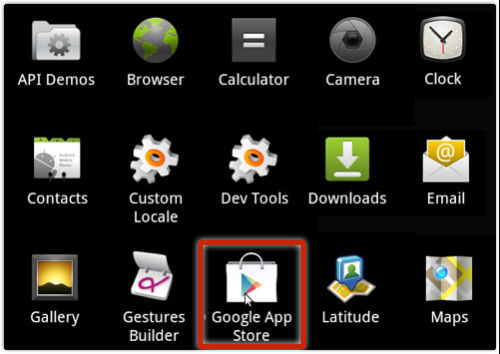
Then, once the downloader is installed, it loads the Android malware onto your device in what appears to be an app disguised as a Google-imitating “Google App Store” (the real Google store is simply called “Play Store”).
This is a good reminder that the bad guys continue to develop inventive ways of compromising our security to get at our most valuable data. Read the article at Naked Security to learn more about this malware and how to block it with security settings on your Android.
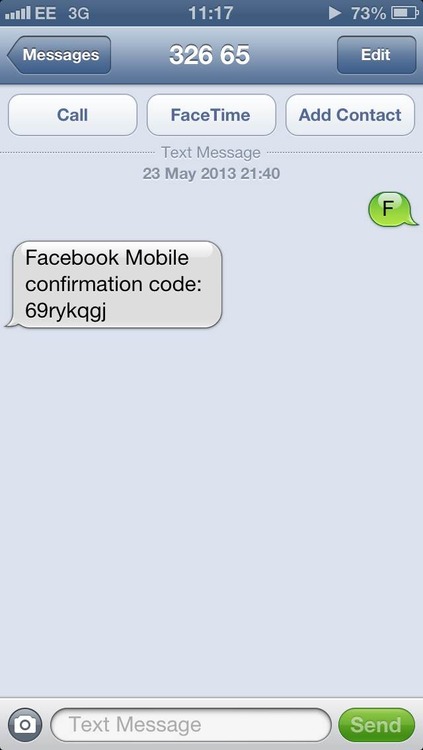
As it is, Whitten explains, Facebook gives users the option of linking their mobile numbers with their accounts. Users then can receive updates via SMS and can also login using their phone number rather than their email address. Whitten found that when sending the letter F to Facebook’s SMS shortcode – which is 32665 in the UK – Facebook returned an 8-character verification code. After submitting the code into the activation box and fiddling with the profile_id form element, Facebook sent Whitten back a _user value that was different from the profile_id that Whitten modified.
Whitten says that trying the exploit might have led to having to reauthorize after submitting the request, but he could do that with his own password instead of trying to guess at his target’s password.

After that point, Facebook was sending an SMS confirmation. From there, Whitten said, an intruder could initiate a password reset request on his targeted user’s account and get the code back, again via SMS. After a reset code is sent via SMS, the account is hijacked, Whitten wrote: We enter this code into the form, choose a new password, and we’re done. The account is ours.

Facebook closed the security hole by no longer accepting the profile_id parameter from users. This could have been a valuable flaw were it to fall into the hands of attackers who might have used it to steal personal data or send out spam. As it is, one commenter on Whitten’s post who obviously didn’t understand the “it’s now fixed” part of the story made the bug’s value clear with his or her eagerness to figure out how to exploit it: ›khalil0777 • a day ago
someone explain me how to exploit it i am realyy need it i wait your helps friends :/
:/ oh well, ›khalil0777, looks like you’re too late for that party.
I’d say better luck next time, but perhaps instead I’ll save my good wishes for Mr. Whitten.
May he enjoy his $20,000.
It was well-earned, and it’s a bargain for Facebook even were the reward to be doubled, considering the grief that could have been caused by such an easy exploit.
Click here to see the original article.

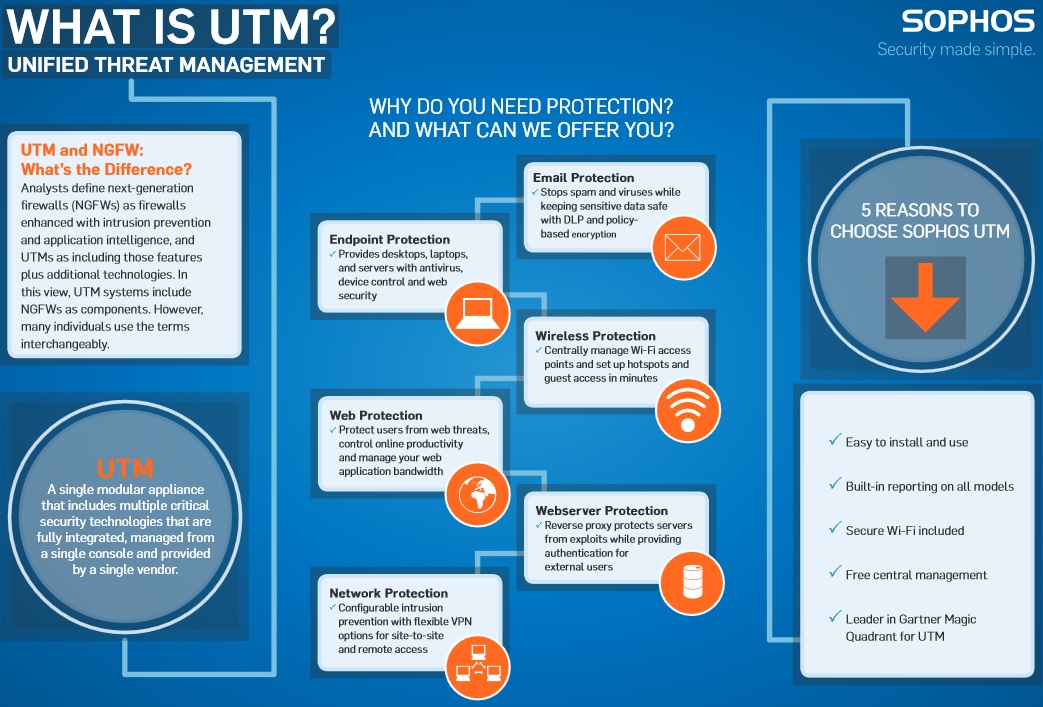
UTM Series appliances will remain an important part of our hardware appliance portfolio and continue to enjoy all the great new features and enhancements that come with every software update. Our UTM Series delivers unmatched value with a great balance of price, performance and protection.
As you know, at Sophos, every feature is available on every appliance — and our UTM Series appliances are no different. And because they are based on an Intel architecture, you can benefit from all future software enhancements and performance optimizations — past, present, and future.
Features you get with Sophos UTM Series
- Intel architecture provides a future-proof upgrade path unlike ASICs
- Same protection on every appliance, from our smallest to our largest
- Cluster up to 10 appliances dynamically without external load balancers
- A range of models at performance and price points to fit diverse environments
- Sophos UTM Series — Eight (8) models suitable for organizations of all sizes
Small: The UTM 100, 110, and 120 are ideal for small organizations or branch offices that have less demanding traffic capacity requirements, but still want the best network protection
Medium: The UTM 220, 320 and 425 provide the optimal balance between performance and protection for a variety of different environments.
Large: The UTM 525 and 625 are designed to protect even the most demanding enterprise networks. They are purpose built for scalability, reliability, and high availability.
UTM Series Tech Specs

Datasheets: UTM 1xx | UTM 220 | UTM 320 | UTM 425 | UTM 525 | UTM 625
You can read the original article here.
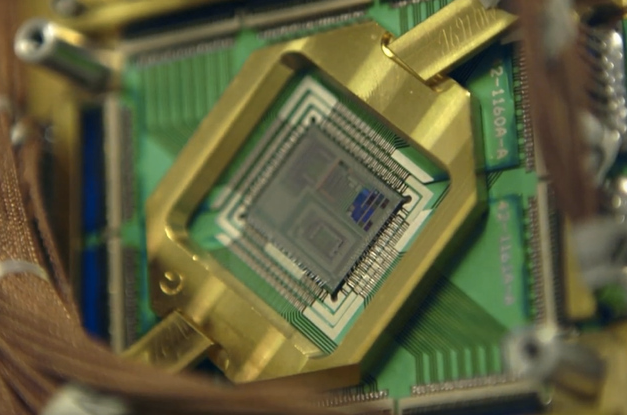
Quantum computing hinges, very broadly, on allowing individual bits (called qubits) to contain superimposed values of zero and one, vastly increasing computing power. Its implications for cryptography, medicine, and research have made it a major goal for public services and private industry alike: DARPA has devoted years of funding to quantum computing research, and Google launched its own “Quantum Artificial Intelligence Lab” last year.
But while qubits have been stored for a limited period of time under certain conditions, and specialized machines have been built using quantum technology, that’s not enough for practical code-breaking applications. Last year, for example,The Economist all but ruled out the possibility that the NSA had a crypto-ready quantum computer.
The NSA’s program, part of the larger intelligence community “Black Budget,” doesn’t actually task anybody with building a quantum computer. According to the memo, it asks researchers to “conduct basic research in quantum physics and architecture/engineering studies to determine if, and how, a cryptographically useful quantum computer can be built.” So while the grant fits with the NSA’s general mission — and quantum computing could one day pose a real threat to present-day encryption methods — it’s a lot more theoretical than the agency’s ability to, say, seed malware to computers from miles away.

You can read the original article here.

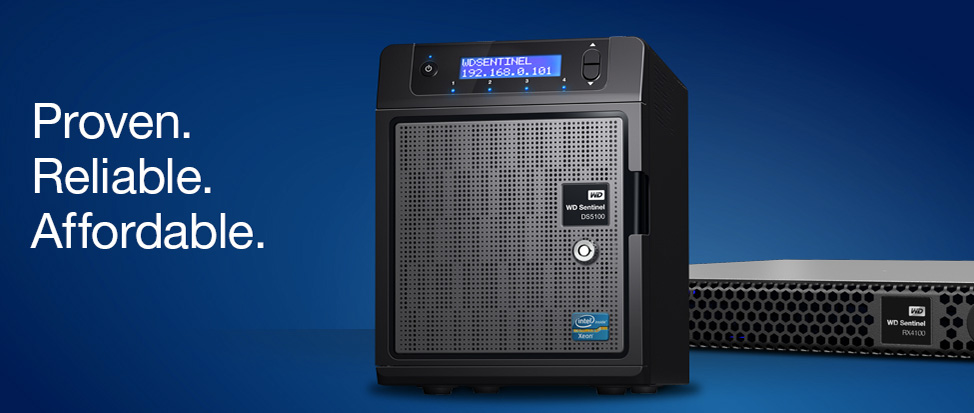
“WD is using enterprise-class components to build a new family of network appliances for small businesses,” said Bill Evans, general manager of WD’s business storage solutions group. “The WD Sentinel S-series network appliances are engineered with Intel Xeon processors, pre-populated with WD Se datacenter 3.5-inch hard drives for rapid deployment, and feature dedicated 2.5-inch boot drives for maximum reliability. No other vendor offers a comparable network storage plus server in an equally small form factor. With a small footprint and quiet fan, an S-series appliance can be deployed anywhere.”
Proven Components from Intel, Microsoft, and WD
Built by WD, powered by an Intel Xeon processor and running Windows Server 2012 R2 Essentials, the WD Sentinel S-series is based on proven technologies from industry leaders. Unlike competitors’ proprietary operating systems, the S-series is a fully configured native Windows Server on which customers can deploy thousands of Windows applications.
“Windows Server 2012 R2 Essentials gives customers the benefit of built-in, groundbreaking, low-cost storage technologies, and WD’s Sentinel S-series hardware helps small businesses take advantage of these technologies,” said Jamie Hamilton, Director of Marketing, OEM Division at Microsoft Corp. “We are pleased to work with WD to tackle the small business, first-server opportunity. WD’s hardware engineering expertise, previous success with network storage products based on Windows Storage Server, and leadership in offering an R2 version of Windows Server 2012 Essentials puts WD in a good position to serve this industry.”
Reliable Enterprise Grade Components
The WD Sentinel S-series include WD 3.5-inch datacenter-class hard drives for enhanced data security. Businesses gain enterprise-class reliability with dual dedicated boot drives (optional on WD Sentinel DS5100), dual gigabit Ethernet ports, and dual external DC-in power adapter ports. This engineered redundancy, along with a bezel lock for physical security, all add to the reliability of this ultra-compact network storage plus server that can be deployed virtually anywhere.
Affordable First Server for Any Small Business
The WD Sentinel S-series is a complete, fully-configured solution with automatic backup and restore software for up to 25 users and 50 computers, all at a very affordable price that starts at $2,560 U.S. MSRP. By combining a single solution for both storage and server requirements, the S-series appliances are a great solution for any small business looking for their first server.
“Finally, a network storage vendor has delivered a low-cost, turn-key solution that meets my customers’ requirements—with no assembly required,” said Kevin Royalty, Microsoft MVP and Managing Partner of Total Care Computer Consulting in Centerville, Ohio. “Small business customers want a packaged solution with balanced disk, processor, memory, and operating system that is engineered and tested as a unit. The DS5100 and DS6100 appliances are ideal as a ‘first server’ due to the high-performance Intel Xeon processor, Windows Server, high-capacity enterprise-class disk storage, and tiny footprint.”
Availability
WD Sentinel S-series appliances are available today at CDW, PC Connection, and Insight, and through select VARs, resellers, and distributors worldwide. The WD Sentinel DS5100 is pre-populated in capacities of 4 or 8 TB. The WD Sentinel DS6100 is available with capacities of 8, 12, or 16 TB.

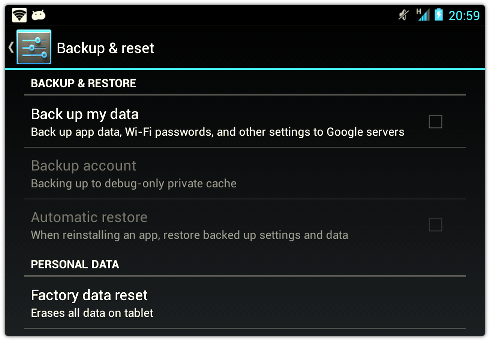
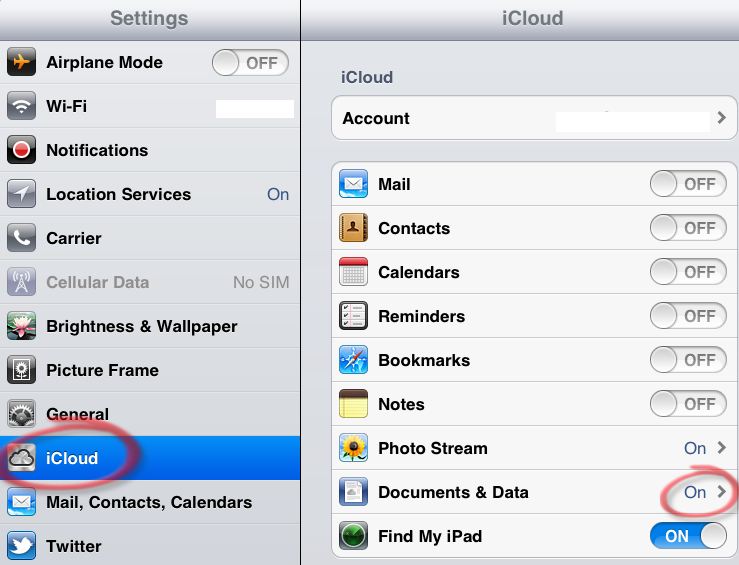
Instead of just reinstalling your favourite apps and starting afresh, your new device will know how to get online straight away, how to get into your Twitter account, and how many Angry Birds levels you haven’t conquered yet. Clearly, Google keeps a raft of configuration data on your behalf, because if you have the option enabled and then decide to turn it off you get this dialog: So how risky is this option? It’s not risky in the sense, for example, of the recent flaw in the Tumblr app on iOS. There, Tumblr forgot to secure the actual transmission of personally identifiable information (PII), such as your password.
That meant that crooks at a coffee shop, for example, might easily be able to sniff out and extract your Tumblr password. The Android issue is more subtle: the data is encrypted in transit, and Google (for all we know) probably stores it encrypted at the other end. But it’s not encrypted in the sense of being inaccessible to anyone except you. That’s obvious because, you can recover your data from Google even after you’ve wiped (or lost) your device, or changed your Google account password. In other words, Google can unilaterally recover the plaintext of your Wi-Fi passwords, precisely so it can return those passwords to you quickly and conveniently even if you forget your device password and have to start over. That’s just the sort of convenience which many users will trade against security. So, let’s say some Three Letter Agency were to use some prismatic techqniue to acquire those Wi-Fi passwords from Google. Is that likely? If so, would it be bad? I have to say that it probably would be, if only because the list of Wi-Fi networks and passwords on your device is most likely much more extensive than just your own network in your own home.

You’d effectively be helping to built a list of passwords to go with the already-existing and extensive maps of Wi-Fi access points built up over years, both by Google and others. You probably don’t want to help anyone, friend or foe, to do that. The solution is to encrypt everything “for your eyes only” before you back it up anywhere, especially into the cloud. And the problem with that is it’s not quite as convenient, not least because there’s no password-free way to recover that backed-up data, for example if you forget your password. That’s the dilemma we all face. Are you prepared to accept a digital equivalent of locking your keys in the car forever (for example if you forget your full-disk encryption password and didn’t save the recovery key)? Or would you prefer to have what amounts to a backdoor to your own, or worse still, to other people’s, personal information? What do you think?
You can read the original article, here.
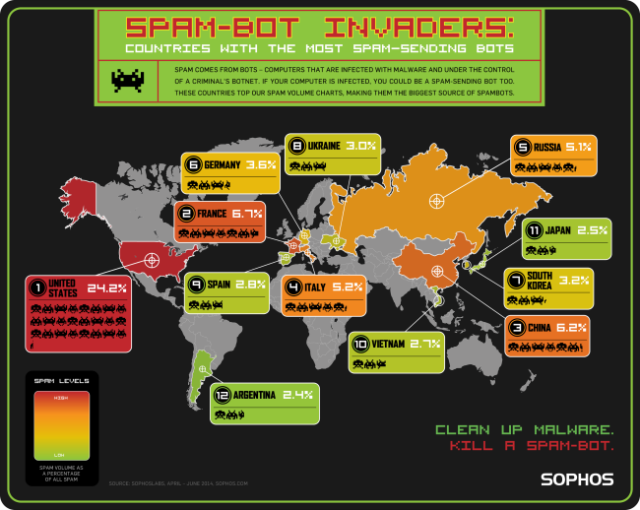
When you consider the country’s huge online population, it’s not surprising that the U.S. sends so much spam. Spam comes from “bots” — computers infected with malware and under the control of a criminal. “Bot masters” can use servers anywhere in the world to give the bots instructions. So spam-bots in the countries on our list aren’t the authors of the spam, they are more like the messengers.
While it’s interesting to call out the 12 “dirty dozen” countries that send the most spam by volume, we also like to look at the amount of spam by population. It’s a diverse list of nations, and even small countries have a big spam problem.
The Dirty Dozen Spampionship
We’ve been measuring spam in our quarterly “Spampionship” going back a few years, and the U.S. consistently tops our charts. As you can see in the graphic below, bots in the U.S. send by far the most spam of any country, with second-place France (responsible for 6.7% of spam) well behind.
Other countries in our top 12 include China (third at 6.2% of spam) and Russia (fifth at 5.1% of spam), both consistently at the top of our charts quarter after quarter.
Spam per person – a fairer measure
We also look at spam “per person.” We do this because we think it’s a fairer measure of how spammy a country is. By setting the U.S. as the baseline, we can see how likely it is that a computer in a given country is a spam-sending bot compared to the U.S.
This past quarter, Bulgaria was the top country for spam per person, coming in at 2.1 times the U.S. Belarus, which had been the tops of the spam per-person chart for the past year, dropped to second place, at 1.9 times the U.S. spam level.
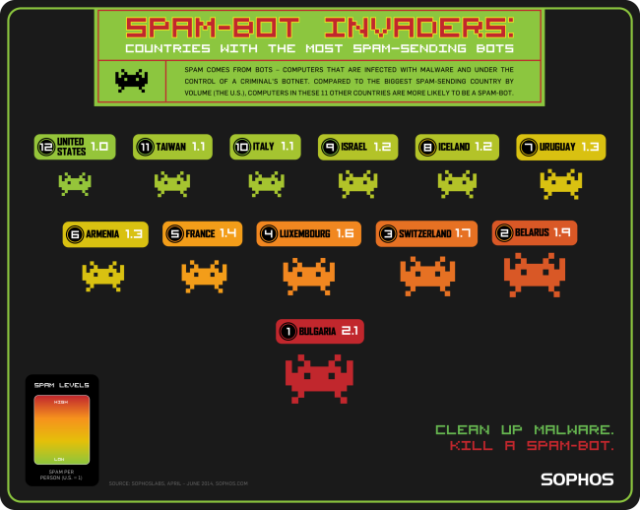
Fight back against spam and cybercrime – kill a spam-bot
Spam is truly a global problem — spam-bots can be anywhere in the world. Remember, if your computer is infected with spam-sending bot malware, you are part of the problem. Do your part to fight back against spam — download our free Virus Removal Tool to scan your computer and automatically clean up malware.
You can learn more about our “Spampionship” series by visiting our award-winning Naked Security blog. If you’re a business looking to keep your email secure, Sophos blocks spam and email-borne threats. Learn more about email security from Sophos.
You can read the original article, here.