


















PRODUCTS

Cyber Security Elements by NSS

News

15

Jan

Here are the Top 10 reasons to choose Array’s APV Series Application Delivery Controllers (ADCs). Today, many industries and enterprises are looking to simplify and optimize business operations. Array’s high-performance technology is the first step towards achieving that goal. Designed to solve real-world business and organization problems, Array’s solutions can dramatically increase employee productivity and business agility while streamlining network management and delivering dramatic cost savings. With the advent of virtualization, public and private clouds, the explosion in mobile traffic and the move towards new standards including IPv6 and 2048-bit encryption, modern application delivery controllers must provide performance and scalability in line with the demands of mobile and cloud computing and the agility to extract maximum efficiency and ROI from application infrastructure.

Array APV Series application delivery controllers address the challenges faced by enterprise, service provider and public sector organizations in the areas of application and cloud service delivery. Available as purpose-built appliances or software engineered for virtual environments, Array ADCs combine cutting-edge performance and scalability with transformative features at industry-leading price points, creating unmatched value and ROI as compared to brand name alternatives.

Top 10 Reasons to Choose APV Series Application Delivery Controllers (ADCs)

1) Superior Performance
Delivers 99.999% application availability, up to 5x application acceleration and provides a first line of defense for Web-enabled applications and cloud services.

2) Management Integration
Array’s eCloud™ API provides a script-level interface for cloud management systems.OpenStack integration allows rapid integration and control of Array technology.

Array APV Series application delivery controller1

3) Lowest Cost per SSL TPS
Typically 30 – 70% lower cost than similar models for 2048-bit SSL across the complete APV Series product line.

4) IPv6 Migration
Array’s DNS64/NAT64 allows organizations running IPv6 networks to access IPv4 networks, servers and content. Array’s SLBPT allows organizations with an IPv4 Web presence to support access from IPv6 clients.

5) Easy Traffic Management
Advanced Layer 7 policy engine, SpeedPolicy, offers point-and-click WebUI configuration executed at the system level for agility and performance.

Array APV Series application delivery controller2

6) High-Performance Features
Since features are executed at the system level, APV appliances maintain unmatched levels of performance with multiple, concurrent features enabled.

7) Multi-Layer Security
WebWall provides the first line of defense for Web-based cloud apps and shields Web Application Firewalls from brute force attacks and unauthorized requests.

8) Great Support
Array’s pre- and post-sales engineers and customer support are committed to strive for excellence and continual improvement in quality.

9) Flexible Platform Options
Physical, virtual or multi-tenant – APV Series offers all three options. And AVX10650 is a true multi-tenant ADC, with dedicated SSL, I/O and compute resources for up to 8 instances.

Array APV Series application delivery controller3

10) Established Company
With a 10-year record and proven at thousands of worldwide customers, Array application delivery networking solutions are recognized for industry-leading performance and value.

15

Jan

We also found out that the Heartbleed bug is in a version of the OpenSSL software that’s two years old — so this vulnerability could have been attacked for a very long time by someone with the resources to exploit it. 

Sophos security experts helped us to understand Heartbleed and what it means, how to protect yourself, and why we should all be thankful for open source software, even if it’s not perfect.

Chester Wisniewski, Sophos senior security advisor, let us in on what Heartbleed is and why it’s so important for security on the Internet. Chet explained that OpenSSL sends a small packet of data back and forth between web servers to make sure the connection is still working, what’s called a TLS Heartbeat.

Only now it turns out that web servers could be tricked into sending huge amounts of system-stored data in response to a Heartbeat ping — data which could include passwords and encryption keys. In an opinion column published on CNN.com, Chet described how two-thirds of all websites were vulnerable to Heartbleed. Fortunately, most major Web services have already applied fixes to the affected Web servers and services. The bad news is that smaller websites as well as many companies’ products that rely on OpenSSL may linger for many more years without a fix.

Chet told BuzzFeed that an even bigger concern is who might have known about the Heartbleed bug before the rest of us caught on — and the most likely organization to know would be the U.S. National Security Agency (NSA), which has the means and an interest in finding such vulnerabilities.

“That’s exactly what the leaked NSA programs are supposed to do: Find the flaws, exploit them and never tell anyone,” Chet said. According to Chet, the “open” part of OpenSSL means this vital security software is maintained by volunteer researchers, not commercial interests. And that means we should be focusing our attention on supporting the open parts of the Internet that we rely on for freedom of communication.

All of us have come to rely on the Internet socially, politically and economically. The billions of dollars a year being made by the tech giants would not be possible without the millions of donated hours that maintain free and open software like OpenSSL, Linux, Apache Web server, and Postfix mail server.

You can read the original article here.

15

Jan

1. Always secure your smartphone with a password

One of the most basic security tips, but one which is sometimes completely overlooked! Having no access protection at all is just foolish. Swipe patterns are ok, but greasy finger-trails could reveal too much. A four-digit PIN is an improvement but using a strong passcode is the ideal phone protection.

2. Ensure that your device locks itself automatically

If you set up password-protection on your phone but then leave it unlocked on your desk for 15 minutes, you won’t have achieved very much. Most smartphones allow you to set them up to automatically lock themselves after a period of inactivity. Make sure you choose the shortest timeout you are comfortable with. Two to five minutes is better than ten to thirty, even if it does feel slightly inconvenient.

3. Install security software

Your smartphone is a computing device and should be protected accordingly. Look for an app like Sophos Mobile Security that includes malware prevention, remote data wipe, privacy review of apps and an automatic security advisor to alert you to potential risks when you change a device setting. If you’re in charge of securing your organisation’s phones and tablets, then choose a mobile device management solution like Sophos Mobile Control.

4. Only download apps from approved sources

The Google Play Store and Apple’s App Store take security pretty seriously. They are very careful about what apps they make available and will withdraw apps that raise concerns after release. Read user reviews of apps before installing them – if there are any security concerns then someone else may well have mentioned them.

5. Check your apps’ permissions

Apps. Image courtesy of Shutterstock.Many apps require more than the basic default permissions. For instance, you can reasonably expect an SMS app to send and receive text messages just as a mapping app will request your GPS location. But something like a calculator that needs network access or an alarm clock that wants to read your contact database should be treated with extreme caution!

6. Don’t miss operating system updates

Updates to your OS often include system vulnerability patches, so it’s important to install them. You might want to be advised of updates rather than having them automatically installed, as early adopters sometimes experience teething problems – but the forgetful among you may prefer that to missing updates altogether.

7. Be wary of any links you receive via email or text message

Now you can pick up email on your phone, exercise caution when clicking on links. And phishing scams are not limited to email – a text message can incite you to click on a dodgy link or ask for personal information. Even simply replying to unknown SMS or email senders can raise the crooks’ interest in you, leading to more pressure to respond.

8. Encrypt your smartphone

Even if you’ve secured your smartphone with a password, a thief could still plug your device into a computer and gain access to all of your personal information. Using encryption on your smartphone can help to prevent such data theft.

9. Turn off automatic Wi-Fi connection

WiFi. Image courtesy of ShutterstockOne of the great things about modern mobile phones is their ability to connect to the internet in many ways, but continually probing for wireless networks gives away information about your identity and location, and blindly connecting to unencrypted access points can let your phone leak all sorts of useful things for malicious actors to intercept and act upon. So tell your phone to forget networks you no longer use, so as to minimise the amount of data leakage and configure your phone to automatically turn on/off wireless in certain places using a location-aware smartphone app.

10. Turn off Bluetooth and NFC when not in use

Bluetooth and NFC (near field communication) are great in terms of connectivity, allowing you to use accessories such as wireless keyboards and headsets or make payments with a wave of your smartphone. But it does open a door for the bad guys to gain access to your device and access your data, so you should either switch these features off or put your device into “not discoverable” mode whenever possible. Also, be careful when pairing devices – never accept requests from unknown devices.

You can read more here.

15

Jan

One risk is that attackers will have the advantage over defenders who choose to run Windows XP because attackers will likely have more information about vulnerabilities in Windows XP than defenders. The problem is, of course, that once patches stop being provided for newly-discovered vulnerabilities, any problems that are found for more recent versions may well be backwards-compatible with XP. As details of these issues will be widely publicised, for very good reasons, there’s bound to be plenty of research going on into which ones can be used to penetrate the systems of anyone still clinging on to XP. Indeed, some people have already speculated that the bad guys will soon be stockpiling newly-found bugs until after the patch deadline, building up an arsenal of woes to unleash on those too lazy, poor, or stuck in their ways to upgrade.

Once the April 2014 deadline has passed, the world of Windows XP will be a perpetual zero-day, with no hope of relief from danger. It’s clearly in Microsoft’s interest to spread maximum fear, to squeeze as much revenue as they can out of Windows users who will have to pay to step up to Windows 7 or 8. But their warnings do carry considerable weight. In operating system terms, XP is pretty ancient, having been released in 2001 and reaching the end of its standard back in 2009. When the five-year extended support phase ends the platform will have very nearly reached its teens. It remains remarkably popular though, with the best available stats putting it on anywhere from 13 to 30% of systems browsing the web – well overtaken by Windows 7 nowadays, but still streets ahead of Windows 8. Its stability, simplicity and familiarity will make it hard to dislodge from a huge residual user base.

This has led to some speculation that Microsoft might relent and extend the support period further, but this seems unlikely. As Rains also points out in his blog piece, even with regular patching, the security provisions in XP just don’t cut it any more, leaving its users open to all sorts of dangers they would be immune from out-of-the-box with less creaky platforms.

You can read the original article here.

15

Jan

And, as an IT professional, I faced the same challenge in all of these roles: SMBs have many of the same infrastructure needs as larger enterprises, but I didn’t have the time, budget or expertise to implement enterprise technology. Antivirus is a great example.

When I worked at an educational non-profit organization, we had a couple hundred users and a fast-changing environment. We had students doing who-knows-what with the classroom computers, limited Internet bandwidth that was often brought to its knees by people watching streaming video during peak usage times, and an Executive Director who wanted to use his Blackberry for work.

I was familiar with technologies like device control, host-based intrusion prevention systems (HIPS), web content filtering, and mobile device management. But who had the time or budget to research, acquire, learn, configure and maintain each of these systems?

Like most SMB IT professionals, I was left with a choice: attempt to implement one or more complex enterprise solutions as best I could, or I could compromise on the features and integration by selecting a hodgepodge of “small business” products. Goodbye Active Directory sync and HIPS! Hello separate web filtering, antivirus and mobile solutions!

It is no exaggeration to say that if someone had showed me Sophos Cloud back then, I would have thought it was an April Fool’s prank. No server and console to configure and install? Enterprise-class technology that is both affordable and easy to use? Everything integrated into a single intuitive interface?

Surely that’s not possible! And, to be fair, it wasn’t possible back when I was working in IT. But today it is.

About Sophos Cloud

Sophos Cloud provides everything you need to manage security for all of your organization’s end user devices: Windows, Mac and mobile. From device control to HIPS, Active Directory sync to web content filtering, it’s all there.

More importantly, it’s designed to give you enterprise-level protection with Sophos’s trademark simplicity. It’s almost enough to make me wish I was working in IT again.

Try it out today. You’ll be up and running with the 30-day free trial in just 60 seconds.

You can read the original article, here.

15

Jan

The current total of 650,000+ pieces of Android malware is up by approximately 600% from last January. Check out our mobile malware timeline below for our picks for the most important developments of the past decade, from the birth of mobile malware to today.

Mobile Security Threat Report

It’s been 10 years since the first mobile malware appeared. To mark this dubious anniversary, we’ve produced our first Mobile Security Threat Report. Download the report at sophos.com/mobilethreatreport to see how mobile threats have evolved, and to learn how best to protect yourself and your organization.

Get the free app: Sophos Mobile Security for Android

Sophos Mobile Security is a robust yet lightweight app that protects your Android devices without compromising performance or battery life. Using up-to-the-minute intelligence from SophosLabs, it automatically scans apps as you install them. Other features include a privacy advisor, encryption, and per-app password protection that you can set up for sensitive apps like your email. We’ve received several awards and many great reviews for Sophos Mobile Security, which has been downloaded more than 100,000 times from Google Play.

You can read the original article here.
15

Jan

This list was conceived to put a spotlight on the professionals driving one of the most important customer segments in the industry today. These executives were nominated by peers, colleagues, customers and partners because of the strong relationships they have built with midmarket customers, for their leadership, strategic thinking and solution excellence they demonstrate. Valentine was also named a “top disrupter,” a listing of the 25 executives who shook up the IT industry this year.

Kris Hagerman, chief executive officer for Sophos, said, “Mike has been with Sophos for less than a year, but he’s already making an enormous impact. As the architect and driver of our “Channel First” sales strategy, Mike has enabled Sophos to make major strides to work better and more closely with the channel than ever before. Mike is well-known by the channel as a great leader, recruiter and winner. We’re thrilled to have Mike at Sophos leading our global sales team, and this validation from CRN and our partners provides added evidence that we’ve become the leading choice for delivering complete IT security without complexity.

Commentary from the Sophos Channel
Our partnership with Sophos allows us to provide comprehensive security solutions for clients, datacenters, and the cloud. We are excited about the leadership and direction Mike brings to Sophos,” said Stephen Perciballi, Security Category Leader, Datacenter Group, Softchoice.

Sophos’ commitment to the channel is impressive. It has an outstanding partner program and excellent IT security value proposition with award-winning security solutions that are simple to implement and simple to use. Combined with its determination to help partners like us grow our business, Sophos is delivering on his channel first promise,” said Jez Turner, Sales Director, Foursys. Foursys is a specialist in IT security solutions, with over 16 years’ experience and more than 900 customers in the UK.

15

Jan

 Through the partnership, both parties aim to meet the increasing demand for SSL and other digital certificates requirements in the region through a range of dedicated enterprise solutions.

With over 55 percent growth in the SSL market during the last year (source: www.netcraft.com), the requirement for security in the Scandinavian region is at an all-time high. GlobalSign has been working with TrustZone for several years to encourage best practices for website security throughout this territory, issuing over 11,000 SSL Certificates through TrustZone, resulting in a significant acceleration in market growth of over 100 percent (source: www.netcraft.com). The partnership demonstrates both companies’ commitment in working together to enable customers to benefit from industry-leading SSL security solutions and in providing high levels of customer support, delivered directly by TrustZone at the local level.

The two organizations have joined forces to better serve the enterprise market in particular and are introducing GlobalSign’s leading Managed SSL and Enterprise PKI (ePKI) solutions to TrustZone’s customer base, enabling advanced on-demand management of a range of digital certificates. The scalability of both solutions gives large enterprises the ability to streamline workflows, whilst reducing the cost and time resources typically associated with digital certificate management and PKI deployments.

You can read the original article, here.
10

Jan

Best in Biz Awards, the only independent business award program judged by members of the press and industry analysts.

The Arkeia Network Backup Suite comprises Arkeia Software’s line of backup-and-restore solutions. Administrators can deploy Arkeia’s backup servers as software applications, hardware appliances or virtual appliances. Arkeia Software protects both virtual and physical environments and manages backups to disk, to tape, and to the cloud.

For more information click here

10

Jan

new Router Utility app. Ready when you are, wherever you are, the Router Utility app gives you instant insight into device status, events, bandwidth usage, and more. And with full support for push notifications, you’ll know immediately whenever there’s an important status change or performance issue, helping you to keep small glitches from becoming major problems.

For more information click here

10

Jan

for next-generation networks.

Bandwidth management using deep packet inspection (DPI) is a relatively new field for enterprises or carriers / network operators. Ipoque technology can help solve many of the issues that arise from growing user numbers generating ever more traffic with a large variety of new applications. PRX Traffic Manager solutions detect applications with a combination of layer-7 deep packet inspection (DPI) and behavioral traffic analysis. The integrated quality-of-service (QoS) management allows prioritization, shaping and blocking of classified traffic.

Click here to watch the webinar

10

Jan

latest threat trends as well as tips for fighting back and keeping your people and devices secure.

In the past year cybercriminals found ways to attack new platforms from Android to cloud services. And Sophos saw a resurgence of old malware techniques with new twists. Hackers got smarter and better organized, developing better ways to spread their crime packs and to evade detection.

Fortunately, Sophos security experts at SophosLabs are always on the case.

Download your free copy of the 2013 Security Threat Report here
Playlist of Threat Report videos here
Check out Sophos 2013 security trend predictions here

18

Oct

will be called BasicGuard; this will target smaller businesses giving them all the essential features of a market leading UTM at an affordable price.

What is Sophos launching?

Sophos is launching three new components:

1) Two new entry level appliance bundles UTM 100 and UTM 110 with Basic Guard Subscription. Both are based on the existing Sophos UTM110/120 hardware. BasicGuard is the only feature bundle available for UTM100 and also available as an alternative option for UTM110.

2) With customers connecting more and more devices to their network Sophos is removing the 10 IP/user limitations of the UTM110 and introducing a throughput limitation instead, which is different for UTM100, 110 and 120 (hence depending on the license type while all using the same hardware).

3) A price reduction for UTM110 FullGuard.

Furthermore, BasicGuard contains:

  • Web Application Control
  • Network Firewall & IPS
  • Remote Access and VPN
  • Wireless Protection
  • Web Antivirus and URL filter
  • Email Antivirus and Antispam
18

Oct

Vendor Landscape Report entitled, “Vendor Landscape: Application Delivery Controllers: It’s a Lot More than Just Load Balancing”.

The report assessed the strengths and weaknesses of 10 leading application delivery controller (ADC) vendors. Array received a high score in the “Innovator” category based on its features for support and migration toward IPv6 before much of the competition and for being on the leading edge of SSL acceleration, offering 2048 bit encryption.

Array’s AppVelocity server load balancing appliances optimize the availability, security and performance of enterprise applications, IP data services and data center equipment. Powered by Array SpeedCore™, AppVelocity server load balancing appliances leverage parallel multi-core processing to achieve breakthrough scalability and performance for application delivery.  Available on Array’s APV Series Application Delivery Controller hardware and engineered for modern datacenter, cloud and virtual environments, AppVelocity server load balancing appliances boost application performance and speed return-on-investment from the small enterprise to the large service provider.

For more information click here

18

Oct

improved economics for protection of private and public clouds.

Powered by Array’s award-winning 64-bit SpeedCore platform, the new product gives enterprises and service providers the ability to run Array’s proven AG Series secure access gateways as virtual machines on commodity servers running VMware ESXi, Citrix XenServer or OpenXen hypervisors.

Each vxAG Virtual Secure Access Gateway supports all of the features and functions found on Array’s dedicated hardware AG 1000 Series secure access gateways. Available for 64-bit versions of VMware ESXi 4.1 or later, XenServer 5.6 or later and OpenXen 4.0 or later, the vxAG Virtual Secure Access Gateway gives enterprises and service providers the agility and flexibility to create and offer dynamic secure access services.

For more information click here

18

Oct

adding more bandwidth.

ipoque announced that four more large enterprises have finally said “enough” with adding more bandwidth to solve their open-loop problem of trying to meet their continuous thirst for more throughput. These companies instead turned to ipoque to improve the performance of their traffic by better monitoring and managing their networks.

ipoque’s new white paper illustrates the advantages of a multi-tier architecture of loosely coupled, well-integrated systems that is extensible, flexible and scalable enough to meet present and future challenges of network operators. The document regards the technical background and explains the functions of each network component, focusing mainly on the policy enforcement system.

Fo more information click here

18

Oct

adds new features like dual-band wireless for even greater range, reliability, and speed.

Manage from Anywhere
Like all AP One series products, the AP One 300M offers anywhere, anytime remote management via the InControl cloud-based management platform. And starting with Firmware 5.4, Balance users can centrally manage up to 20 AP One devices for free with the Balance’s built-in WLAN Controller.

Deliver Wi-Fi Everywhere
The AP One 300M also features two Gigabit Ethernet WAN ports and a 2.4GHz/5GHz 802.11a/b/g/n radio for more flexibility and speed, as well as greater signal coverage and reliability.

19

Sep

 enables IT departments to monitor the power flowing into racks and the environmental conditions in and around those racks.

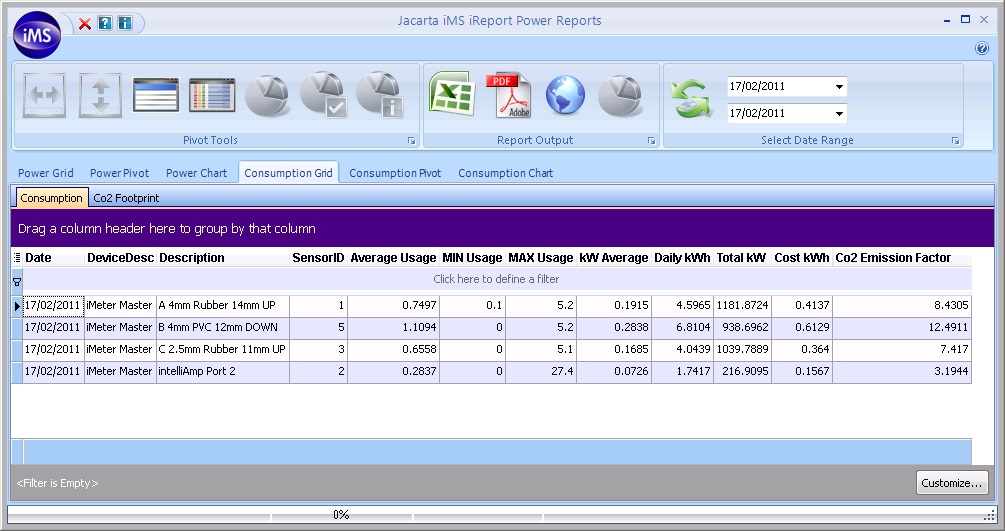
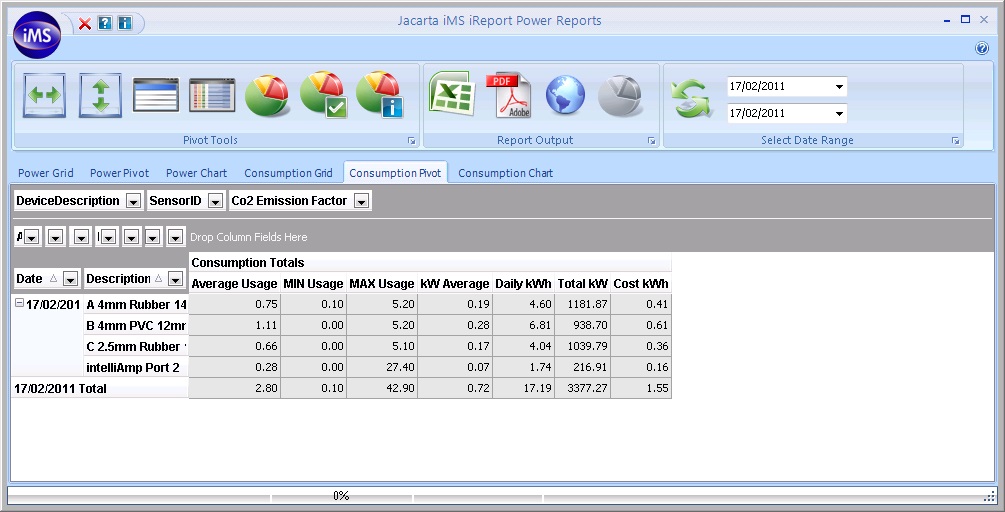
iMeter can monitor up to 600 of the following sensors from a single IP address:

  • Current (Amps) using our unique intelliAmp® current sensor
  • Voltage
  • Temperature
  • Humidity
  • Airflow
  • Water Leak
  • Security (door contact or motion)
  • Smoke

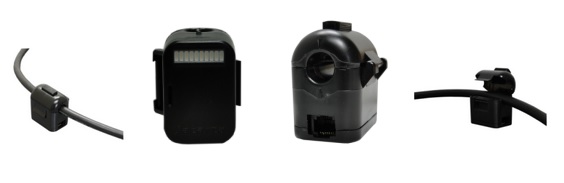
The unique combination of the sensors on offer means that IT and Facilites personnel can analyse the relationships between power usage, airflow and temperature to help assist data centre management decisions relating to cost control and reduction. The design of the Jacarta Go-Probe sensors enables the complete system to be implemented with zero downtime. The intelliAmp current sensor can be clipped to the outside of 16 and 32 Amp power cables to monitor the True RMS current draw of single phase racks without any need to disrupt the power flowing into those racks something absolutely necessary when PDU (Power Distribution Units) are to be used.

Click here to discover the key benefits of Jacarta iMeter

19

Sep

providing more information on the Peplink Balance, Pepwave MAX, Pepwave Outdoor Wi-Fi, and other category-leading networking solutions.

Event Details – Peplink’s Booth

Dubai, United Arab Emirates
Dubai International Convention and Exchibition Centre
ZL-C5, Zabeel Hall
14 – 18 October 2012